DayDrift
Keep your Windows theme, wallpaper scenes, and optional screen warmth in step with your day. In development; not yet available for download.
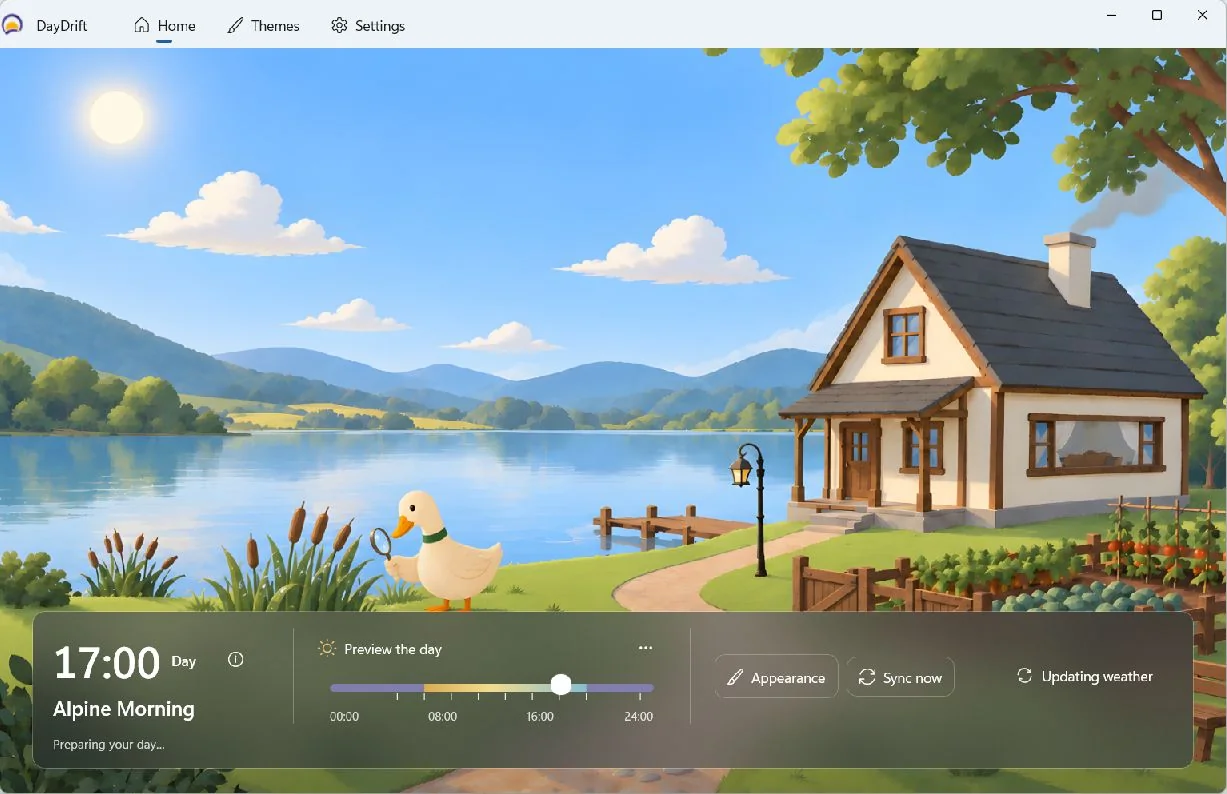
DayDrift lets your Windows desktop move with the day. Morning can feel brighter, afternoons can settle into focus, and evenings can soften without asking you to keep changing settings.
Design story
Most desktop customisation tools ask you to choose one look and leave it there. DayDrift treats the desktop as a living surface that can respond to time, daylight, and the rhythm of your routine.
Let the scene lead
Home gives the landscape most of the window. A compact panel holds the current moment, active theme, and useful controls. The scene provides atmosphere while the interface explains it.
Make time something you can explore
The 24-hour preview sits directly in Home. Moving through it shows how the day resolves without applying those changes to Windows. Returning to live time is an explicit action, keeping exploration separate from the real desktop schedule.
Choose before applying
The Themes page keeps the library and selected theme details together on wider windows. A favourite, a selection, a preview, and the active theme are separate states. Customisation offers a schedule adjustment or a complete editable copy, depending on how much the person wants to change.
Current direction
The Windows app brings together full-screen wallpaper scenes with compact controls for time, weather, themes, and previews. DayDrift is still being refined and is not available for download yet.
Image and source notes
October 2026 development capture, not a fresh application run in this refresh. The application is not yet available for download.
Content refreshed on 7 November 2026 from the published Quack & Honk DayDrift page.
The date shown is the earliest commit in this project's repository (2026-06-23), not a confirmed date when all project work began.